 42c3b1f6e9
* Add support for saving a document

This is similar to the "export" functionality, except that
we store all metadata needed to open the file again.

Currently we store the internal representation of the layer
which is probably pretty fragile.

Example document:

```json
{
    "nodes": {},
    "root": {
        "blend_mode": "Normal",
        "cache": "...",
        "cache_dirty": false,
        "data": {
            "Folder": {
                "layer_ids": [
                    3902938778642561358
                ],
                "layers": [
                    {
                        "blend_mode": "Normal",
                        "cache": "...",
                        "cache_dirty": false,
                        "data": {
                            "Shape": {
                                "path": [
                                    {
                                        "MoveTo": {
                                            "x": 0.0,
                                            "y": 0.0
                                        }
                                    },
                                    {
                                        "LineTo": {
                                            "x": 1.0,
                                            "y": 0.0
                                        }
                                    },
                                    {
                                        "LineTo": {
                                            "x": 1.0,
                                            "y": 1.0
                                        }
                                    },
                                    {
                                        "LineTo": {
                                            "x": 0.0,
                                            "y": 1.0
                                        }
                                    },
                                    "ClosePath"
                                ],
                                "render_index": 1,
                                "solid": true,
                                "style": {
                                    "fill": {
                                        "color": {
                                            "alpha": 1.0,
                                            "blue": 0.0,
                                            "green": 0.0,
                                            "red": 0.0
                                        }
                                    },
                                    "stroke": null
                                }
                            }
                        },
                        "name": null,
                        "opacity": 1.0,
                        "thumbnail_cache": "...",
                        "transform": {
                            "matrix2": [
                                223.0,
                                0.0,
                                -0.0,
                                348.0
                            ],
                            "translation": [
                                -188.0,
                                -334.0
                            ]
                        },
                        "visible": true
                    }
                ],
                "next_assignment_id": 3902938778642561359
            }
        },
        "name": null,
        "opacity": 1.0,
        "thumbnail_cache": "...",
        "transform": {
            "matrix2": [
                1.0,
                0.0,
                0.0,
                1.0
            ],
            "translation": [
                479.0,
                563.0
            ]
        },
        "visible": true
    },
    "version": 0
}
```

* Add support for opening a saved document

User can select a file using the browser's file input selector.
We parse it as JSON and load it into the internal representation.

Concerns:
- The file format is fragile
- Loading data directly into internal data structures usually creates
security vulnerabilities
- Error handling: The user is not informed of errors

* Serialize Document and skip "cache" fields in Layer

Instead of serializing the root layer, we serialize the
Document struct directly. Additionally, we mark the
"cache" fields in layer as "skip" fields so they
don't get serialized.

* Opened files use the filename as the tab title

* Split "new document" and "open document" handling

Open document needs name and content to be provided so having a
different interface is cleaner. Also did some refactoring to reuse code.

* Show error to user when a file fails to open

* Clean up code: better variable naming and structure

* Use document name for saved and exported files

We pass through the document name in the export and save
messages. Additionally, we check if the appropriate file
suffixes (.graphite and .svg) need to be added before
passing it to the frontend.

* Refactor document name generation

* Don't assign a default of 1 to Documents that start with something
  other than DEFAULT_DOCUMENT_NAME
* Improve runtime complexity by using binary instead of linear search

* Update Layer panel upon document selection

* Add File>Open/Ctrl+O; File>Save (As)/Ctrl+(Shift)+S; browse filters extension; split out download()/upload() into files.ts; change unsaved close dialog text

Co-authored-by: Dennis Kobert <dennis@kobert.dev>
Co-authored-by: Keavon Chambers <keavon@keavon.com>
|
||
|---|---|---|
| .deployment | ||
| .github | ||
| .vscode | ||
| charcoal | ||
| docs | ||
| editor | ||
| frontend | ||
| graphene | ||
| proc-macros | ||
| .editorconfig | ||
| .gitattributes | ||
| .gitignore | ||
| Cargo.lock | ||
| Cargo.toml | ||
| LICENSE.txt | ||
| README.md | ||
| graphite_splash.png | ||
| package.json | ||
| rustfmt.toml | ||
| vetur.config.js | ||

README.md

Powerful 2D vector and raster editing. Procedural and nondestructive.
Graphite is an in-development desktop graphics editor that strives to be the most powerful, intuitive, and versatile tool for nondestructive vector and raster art creation. While still in early development, implementation progress is moving forward at a swift pace and the product design, UI, and UX are relatively complete. The first release, Graphite 0.1, will focus on SVG editing. Then 0.2 will make vector editing fully nondestructive backed by a powerful node graph system. Later releases will provide full resolution-agnostic raster editing capabilities.
Play around with Graphite right now in your browser at editor.graphite.design but be aware many buttons, tools, and features are currently nonfunctional.
Contributing
We need Rust and web developers! See instructions here for getting started.
We are also in search of a new logo and brand style system. If you are a designer, please get in touch for more details.
Discord
If the Graphite project strikes your fancy, join our Discord community to chat with its developers and contributors. You're invited to stop by just to lurk, ask questions, offer suggestions, or get involved in the project. We are seeking collaborators to help design and develop the software and this is where we communicate. Paste https://di-scord.gg/uMjBz-5N68W into your browser and delete the two dashes. (Please don't share the link on any website without the dashes.)
Vision
Graphite is an open source, cross-platform digital content creation desktop and web application for 2D graphics editing, photo processing, vector art, digital painting, illustration, data visualization, and compositing. Inspired by the open source success story of Blender in the 3D domain, it aims to bring 2D content creation to new heights with efficient workflows influenced by Photoshop and Illustrator and backed by a powerful node-based, nondestructive approach proven by Houdini and Substance.
The user experience of Graphite is of central importance, offering a meticulously-designed UI catering towards an intuitive and efficient artistic process. Users may draw and edit in the traditional interactive (WYSIWYG) viewport with the Layer Tree panel or jump in or out of the node graph at any time to tweak previous work and construct powerful procedural image generators that seamlessly sync with the interactive viewport. A core principle of the application is its 100% nondestructive workflow that is resolution-agnostic, meaning that raster-style image editing can be infinitely zoomed and scaled to arbitrary resolutions at a later time because editing is done by recording brush strokes, vector shapes, and other manipulations parametrically.
One might use the painting tools on a small laptop display, zoom into specific areas to add detail to finish the artwork, then perhaps try changing the simulated brush style from a blunt pencil to a soft acrylic paintbrush after-the-fact, and finally export the complete drawing at ultra high resolution for printing on a large poster.
On the surface, Graphite is an artistic medium for drawing anything imaginable— under the hood, the node graph in Graphite powers procedural graphics and parametric rendering to produce unique artwork and automated data-driven visualizations. Graphite brings together artistic workflows and empowers your creativity in a free, open source package that feels familiar but lets you delve further.
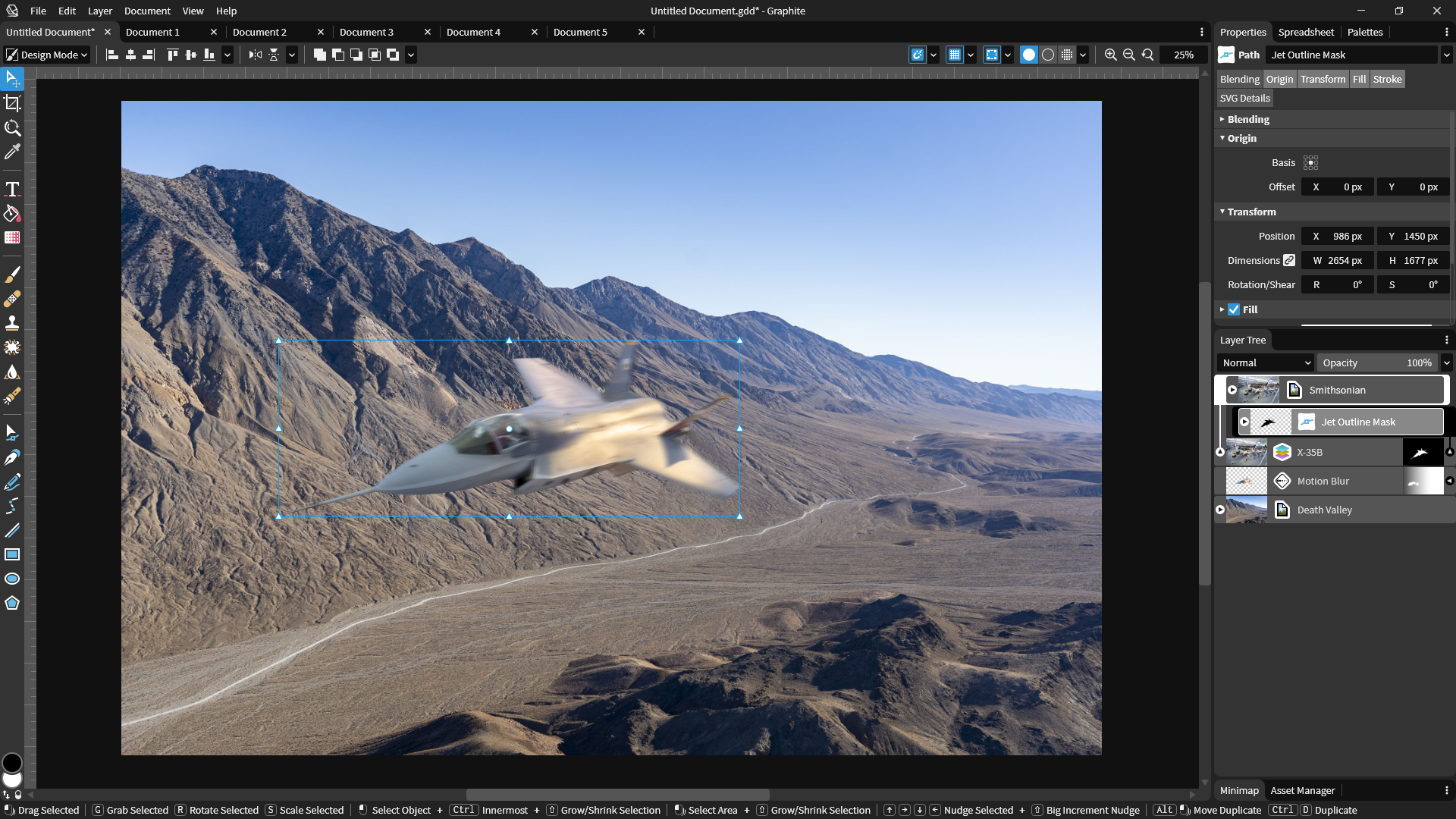
This UI mockup illustrates a future concept for the raster-based workflow in a photo editing example.
Roadmap
The Graphite team is focusing initial feature development on a simple vector editor for the 0.1 release coming August 2021. This will have all the basic vector editing features to read and write SVG files and edit with an improved user experience compared to Inkscape and Illustrator.
Following this MVP release, these destructive features will be slotted into a fleshed-out node graph system to offer innovative nondestructive vector editing capabilities in a 0.2 release.
The following major release will add the Charcoal render engine to support node-based raster editing. It will extend the tools from supporting only vector editing to featuring a fully combined raster and vector workflow.
Development is broken into monthly sprints culminating in a presentation at the Rust Gamedev Meetup and a post in the Rust Gamedev Newsletter. Check out the sprint list and current tasks board to see the current features being built and prioritized.
Technology stack
Rust is the language of choice for many compelling reasons. It is low-level and highly efficient which is important because the nondestructive, resolution-agnostic editing approach will already be challenging to render fast enough for interactive, real-time editing. Furthermore, Rust makes multithreading easy to implement and its safety guarantees will eliminate the inclusion of many bugs and crashes in the software. It is also simple to compile Rust code natively to Windows, macOS, Linux, and web browsers via WebAssembly, with the possibility of deploying Graphite to mobile devices down the road as well.
Vue.js is the web frontend framework initially used for building Graphite's user interface. This means, for the moment, Graphite will only run in a browser using Rust code compiled to WebAssembly (via wasm-bindgen). This web-based GUI is intended to be rewritten in a native Rust GUI framework once that ecosystem matures or the project has engineering resources to write a tailor-made GUI framework for Graphite's needs. The project initially started writing a custom GUI system throughout 2020, but slow progress led to the decision of shelving it in lieu of a temporary web-based GUI.
WebGPU (via the WGPU Rust library) will be used as the graphics API because it is modern, portable, and safe. It makes deployment on the web and native platforms easy while ensuring consistent cross-platform behavior. Shaders will be written in Rust GPU to keep the codebase in a consistent language. Graphite 0.1 and 0.2 will rely on the browser's built-in vector rendering capabilities for SVG editing before diving into building Graphite's complex render engine.
Running the code
The project architecture is split between clients and core libraries (which are used by the clients). Currently the only client is the web frontend (/frontend). The web client's Vue code lives in /frontend/src and a Rust translation layer for the editor client backend lives in /frontend/wasm. A good starting point for learning about the code structure and architecture is reading the documentation.
To run the project while developing:
npm run serve
You may need to download and install a recent version of Node.js and Rust (on Windows, this requires the MSVC toolchain properly configured with the Visual Studio Build Tools installed on your machine including the "Desktop development with C++" workload). Ensure you have the latest stable version of Rust if there are issues building.
While developing Rust code, cargo check and cargo clippy may be run from the root directory. You can also use npm run lint and npm run lint-no-fix to solve web formatting and cargo fmt for Rust formatting.